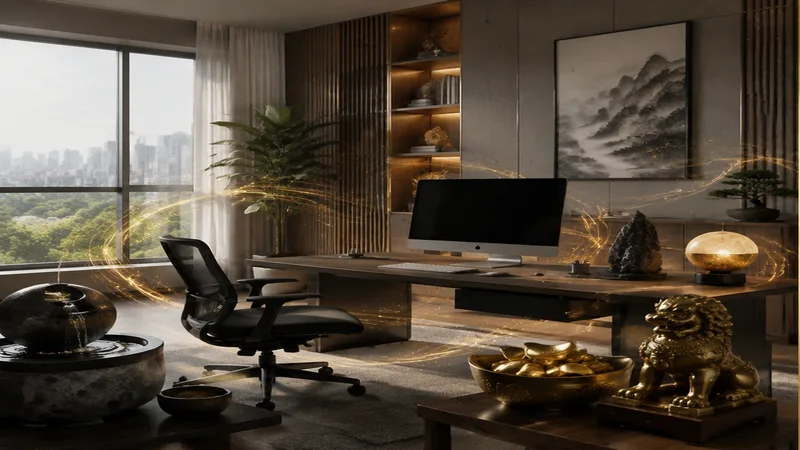
Computer & Screen Feng Shui: Where to Place Your Workstation
In the modern world, the computer is more than a tool—it is a gateway to livelihood, creativity, and connection. When you work from home, your screen becomes an extension of your mind. But in Feng Shui, every object carries energy, and the placement of your computer and monitor can either support your focus, health, and prosperity or silently drain them. Unlike a sofa or a bed, a computer is an active yang object: it generates heat, light, electromagnetic fields, and constant mental activity. Where you position this energetic powerhouse is one of the most important decisions in home office feng shui.
Many people simply put their desk wherever there is a free wall or an available power outlet. Yet the ancient principles of Feng Shui offer a far more intentional approach. The goal is not to create a picture-perfect office, but to position your screen so that you feel safe, grounded, and in control while you work. Let’s explore the key principles, from the commanding position to the five elements, and learn how to place your workstation for maximum clarity and career support.
The Commanding Position for Your Monitor
The first principle to master is the commanding position. In Feng Shui, the commanding position applies to your desk and your primary screen—your computer monitor. It means you should be able to see the door to your room without being directly in line with it. You also want a solid wall behind you, not a window or a hallway. This position gives you a sense of security, as you can see who or what is approaching, while having a metaphorical “mountain” at your back.
When setting up your computer, place your monitor so that your chair and your back are against a solid wall. If that is impossible, use a tall-backed chair to simulate the “mountain” energy. Then, angle your screen so that you are facing the door diagonally. Do not place your computer monitor directly facing a door, as this creates harsh, confrontational energy (Sha Chi) that can lead to stress and scattered thoughts. Similarly, do not sit with your back to the door while working; this can trigger subconscious anxiety, making it hard to concentrate or complete tasks.
“Your screen is your window to the world of work. In Feng Shui, the ideal window is one that shows you the path ahead, yet protects your back. Always strive for support behind you and openness before you.”
If your desk is currently in a spot where you cannot see the door, the simplest fix is to move the desk. But if that is not possible, place a small mirror on your desk or on the wall in front of you so you can see the door’s reflection. This gentle adjustment restores the feeling of awareness without compromising your layout.
Monitor Position and Screen Direction: Facing the Right Way
Beyond the commanding position, the monitor position and screen direction influence your personal energy flow. Your computer screen is a “fire” object—it emits light, heat, and active (yang) energy. Therefore, the direction your screen faces matters both practically and symbolically. Ideally, avoid facing your screen to a wall that is too close. A distance of at least three to four feet between your eyes and the monitor is recommended, not only for your eyesight but also for your energy field. If your screen is jammed into a corner, the compressed Chi can make you feel trapped or overwhelmed.
In terms of compass directions, many Feng Shui practitioners suggest that facing east or southeast is beneficial for growth and prosperity, especially if you work from home. East is associated with new beginnings and vitality; southeast is linked to wealth and abundance. However, personal Kua numbers and the individual layout of your home play a larger role. As a simple rule, let your screen face the direction that feels most comfortable and expansive. If you face a boring, blank wall, add a beautiful picture or a vision board behind the monitor to extend your view.
Another key factor is the screen direction relative to your body. Your eyes are the “windows to the soul,” and looking at a screen for hours requires a steady, calm flow of Chi. Never place your monitor so that you are forced to twist your neck or hunch your shoulders. Place the screen directly in front of your natural neutral sitting position. The top of the monitor should be at or slightly below eye level. This simple adjustment keeps your neck open and your breathing deep, which invites better oxygen flow and clearer decision-making.
The Five Elements in Home Office Feng Shui
Classical Feng Shui uses the five elements—Wood, Fire, Earth, Metal, and Water—to balance energy in any space. Your home office feng shui benefits enormously from understanding how your computer relates to these elements. The computer itself is primarily Fire (the screen glow and electrical energy) with a strong Metal component (the frame, circuits, and metallic parts). Fire and Metal have a complex relationship: Fire melts Metal, which can mean that the Fire of your computer can “drain” your personal Metal energy—your precision, decisiveness, and organizational ability.
To counterbalance this, introduce the other elements in your workstation surroundings. Wood, for instance, feeds Fire but also softens its harshness. Place a small plant on your desk, near but not touching the monitor. A jade plant, snake plant, or even a tiny bonsai brings Wood energy that helps your creativity grow. Green is also an excellent color for a desk mat or a mouse pad. Earth element grounds the Fire of your computer. Use a ceramic mug, a stone paperweight, or a beige or terracotta colored desk organizer. Earth stabilizes the erratic yang energy of the screen, helping you feel more centered.
Water can be tricky. While water extinguishes fire, too much water near your computer can dampen your motivation. In home office feng shui, you can use a small desktop fountain—but place it at least two feet away from the monitor. The sound of water is calming, and its dark color (blue or black) introduces the Water element’s wisdom and introspection. Avoid a large aquarium directly beside your screen; that could overcorrect and leave you feeling sluggish.
Finally, Metal element is present in your computer itself. To balance it, you do not need more metal objects. Instead, use circular or arched shapes in your décor—such as a round clock, a curved lamp, or an arched picture frame—to soften the square, aggressive angles of computers and desks. These shapes enhance Metal’s positive qualities: clarity, sharp thinking, and effective communication.
Fire Element and Your Screen: Balancing the Heat
The fire element is arguably the most dominant force in a computer workstation. The screen emits light and radiation; the processor generates heat; the very act of typing sends electric impulses. All of this is intense yang energy. In Feng Shui, fire is linked to passion, reputation, and visibility—all wonderful for a career. But too much fire leads to burnout, anger, or anxiety. You need to balance the fire element without extinguishing its beneficial spark.
One practical way is to introduce cooling colors into your peripheral vision. Place a small blue or green artwork to the left or right of your monitor. Blue is the color of water, which regulates fire. Green nourishes fire but also brings wood’s steady growth. Avoid painting your whole workspace red or orange; those colors amplify the fire to an overwhelming level. Instead, use a single red accent—like a pen holder or a tiny red crystal—to ignite passion only when needed.
Lighting also affects the fire element. The harsh glare of your screen is pure fire. Soften it by using indirect “daylight” lamps and by pulling curtains over any direct sunlight that hits your monitor. This prevents a hot, flickering clash of light sources. Use a matte screen filter or adjust your monitor’s brightness and color temperature to a warmer, softer tone during afternoon hours. This small change can be transformative for your energy levels, especially if you work from home for long stretches.
“The monitor is a small sun in your office. In Feng Shui, you do not extinguish the sun. You plant a garden around it, place a water stone beside it, and let its light warm you without scorching you.”
If you find yourself feeling irritable, rushed, or mentally “foggy” after a few hours at your desk, your fire element may be out of balance. Take a break, unplug the computer for a moment, and physically step outside. Touching wooden furniture or petting a plant can rebalance your energy through the Wood element. Even moving your chair away from the monitor for five minutes can reduce the fire’s intensity.
Work From Home: Practical Feng Shui Tips for Small Spaces
For those who work from home, the boundaries between personal and professional life blur. Your computer is always there, silently beckoning. Here are some additional Feng Shui strategies to keep your energy clean and your productivity high.
- If possible, place your workstation in a room with a door you can close. Failing that, use a folding screen or a tall plant (like a bamboo palm) to create a visual boundary between your work area and your living or sleeping spaces.
- Never let your monitor face your bed. The activity and light from the screen can disrupt your sleep energy. At minimum, turn the monitor off and cover it with a cloth at the end of the workday.
- Keep cables tidy and out of sight. Hanging or coiled wires create chaotic (entangled) energy. Use a cable box or zip-ties. This also reduces the “beast energy” of industrial objects in your home office feng shui.
- Add a piece of metal, such as a brass pen stand or a decorative steel desk sculpture, to your right side (if you are right-handed) to sharpen analytical thinking. For left-handed people, place it on the left.
- Avoid placing your computer directly under a wall-mounted air conditioner or a ceiling fan. The downward, cutting energy (sharp Chi) can literally “chop” your inspiration. If you cannot move the desk, hang a small faceted crystal underneath the vent to disperse the airflow.
- Represent the fire element appropriately in the “Fame and Reputation” area of your office—the South wall. Hang a small red artwork or a sun-print poster there. This ties your computer’s fire energy to your public image and career ambition.
When you work from home, your computer screen also becomes a portal to your clients, colleagues, and collaborators. Position it so that when you look at the screen, your face is well-lit and your background is calm and uncluttered. A cluttered desktop (real or digital) clogs the Chi around your monitor. Take five minutes each morning to clear physical and digital clutter. This simple ritual sets the tone for a clear, focused work session.
Remember that your monitor position is not just about Feng Shui doctrine—it is about how your body feels. If you feel supported, secure, and aligned, you have found your true commanding position. If you feel tense, distracted, or exhausted, something is off. Walk around your room and notice which wall, which corner, and which angle feels more like a tree—rooted yet flexible. Your computer is a tool; you are the master. By deliberately placing your screen, you align your environment with your intentions, turning your home office into a sanctuary of flow and achievement.
Start with the simple changes: move your desk to see the door, add a plant beside your monitor, and soften your screen lighting. Then observe how your work feels. Feng Shui is not magic; it is the art of tuning your environment to support your highest self. And in our digital age, where we spend thousands of hours staring at glowing rectangles, giving careful thought to computer placement, monitor position, and screen direction is one of the kindest things you can do for your mind, body, and career.